home / how it works
how it works
From one call to your first researched lead.
We set up your AskFletch website chat with you, usually in a single call. This is everything that happens after that: the first visitor it talks to, the lead in your inbox, and the summary at the end of the month.
the journey
Your part is the first call. After that, you choose how involved to be.
After setup, you can be as involved as you like: answer the questions it passes to you, step in when you want to, and correct it when it gets something wrong.
- 01
the setup call
We read your site and agree the rules
Before we talk, we'll have AskFletch reading your website. On the call we agree what you do, what you don't take on, the prices it may quote and where enquiries should go. Usually a single call.
- 02
before it goes live
We train it on your business
We train it on your website, services and prices, and teach it what it shouldn't say. You choose the tone, and how forward it is: a short hello, opening itself, or waiting quietly in the corner. Where enquiries need more than one route, we build a custom workflow with several goals and branches.
- 03
going live
One line of code on your website
It works on WordPress, Squarespace, Wix, Shopify, Webflow and hand-built sites. A bubble in the corner, or built into a page. We'll install it for you if you'd rather.
- 04
a visitor asks something
It answers from your website
From what's actually on your site, in the tone you chose, with the page that covers it shown in the chat. It turns away work you don't do, kindly, and only quotes figures you've approved. It always says it's an AI.
- 05
when they're ready for more
It moves the enquiry on
An answer is only the start. It can show a gallery of your work, send your brochure, offer a call, or check your calendar and suggest times you're free, so every conversation ends with a next step.
- 06
as the conversation ends
The enquiry goes where it should
Each enquiry is routed by what happened in the chat: a booked call to one person, a brochure request to another, a quote to whoever prices the job. Geo-fencing keeps it to the areas you cover, for the whole business or just for particular services.
- 07
an enquiry comes in
You get a lead you can call
It asks the questions your team would ask, then looks the company up on Companies House and their own website. The lead email gives you the enquiry in two lines, who they are, and a note on whether they look like a good fit. Reply by email in one click, or read the whole conversation.
- 08
when it doesn't know
It says so, and asks you
It tells the visitor someone will come back to them, takes their details and emails you the question. Answer it once from the inbox in your dashboard, and it uses your answer next time someone asks.
- 09
whenever you want
You can step in
If you'd rather handle a conversation yourself, step into it from your dashboard and reply.
- 10
when a reply isn't right
Correct it once, and it uses your correction
Press "Fix this reply" on anything it got wrong. You can also rate a conversation, say what it should have done, and approve the lesson. Nothing changes without you.
- 11
every month
See how it's doing
Each month you get a performance summary, so you can see how it's doing. Analytics in your dashboard are coming soon.
what your visitors see
A straight answer, or a kind no.
Here it's set up for a commercial heating firm. It turns away the home boiler, answers the office enquiry from the firm's own pages, and leaves the price to the team.
Hello. I'm the AI assistant for this website. Ask me anything about our commercial heating work.
Do you service boilers at home? Mine's playing up.
We only work on commercial heating, so we're not the right people for a home boiler. A Gas Safe registered engineer near you is the best place to start.
Fair enough. Our office has two gas boilers in a plant room. Could you service those?
Yes, that's work we do. This page covers it:
Planned maintenance/commercial-maintenance
The price depends on the equipment, so the team will confirm it. Can I take a few details so they can come back to you?
Example with made-up details.
what lands in your inbox
Who they are, what they want, and whether they fit.
The enquiry in two lines, with the details your team would ask for. Companies House and their own website, summarised. A note on fit. Then reply by email in one click, or read the whole conversation first.
New enquiry: Jo Reid, Sample Estates Ltd
from askfletch → [email protected]
// about the company
- Sample Estates Ltd · Active · Incorporated 2016
- Manages office buildings in the city centre
- Looks like a good fit: commercial, planned maintenance
what you'll see
Everything you need, in your dashboard and your inbox.
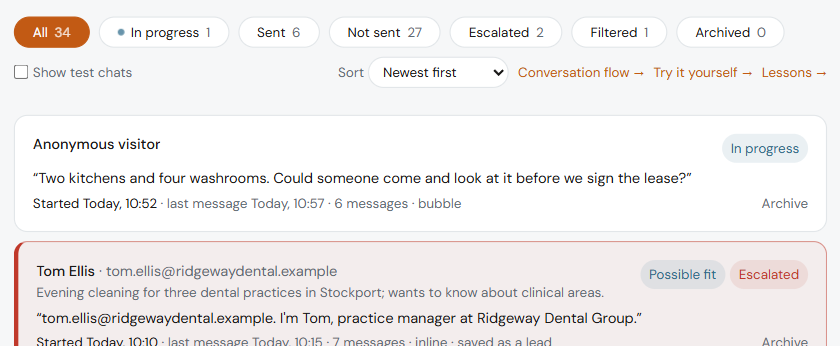
The inbox
Where you answer the questions it passed to you, and read its conversations.
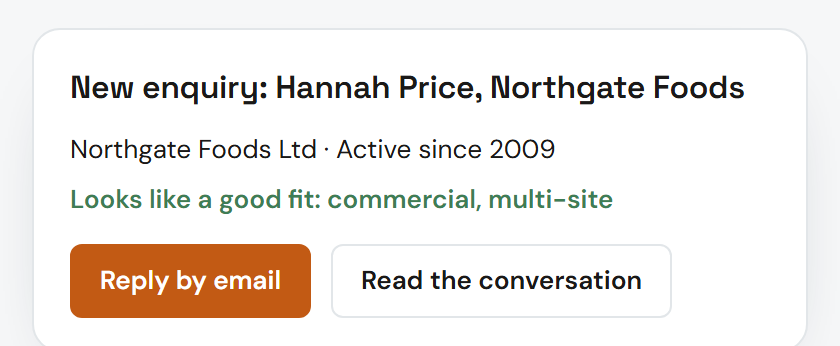
The lead email
The enquiry, the company research and a fit note, with a one-click reply.
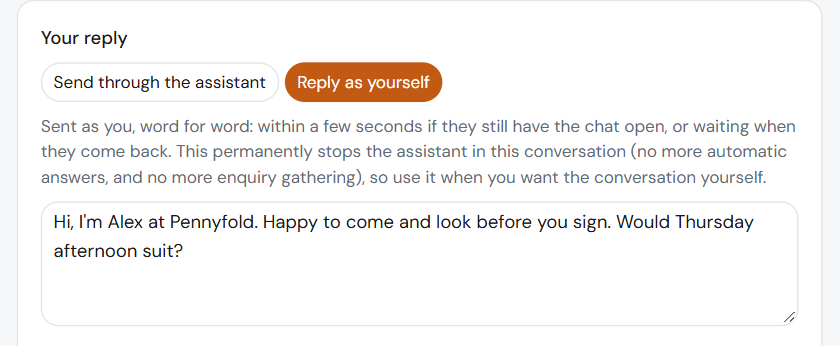
Stepping in
Take over a conversation from your dashboard when you'd rather reply yourself.
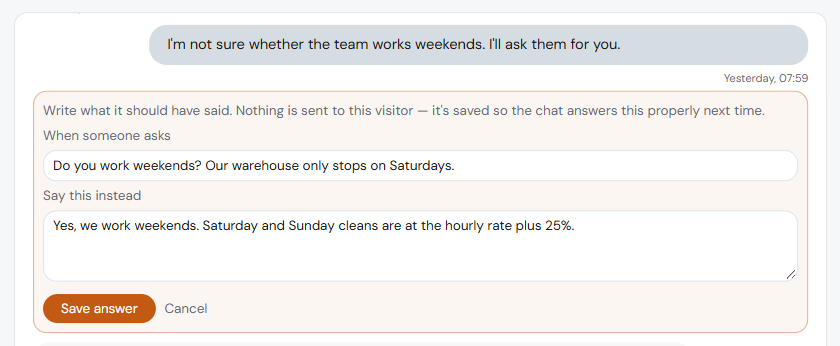
Fix this reply
Correct a reply it got wrong, and it uses your correction.
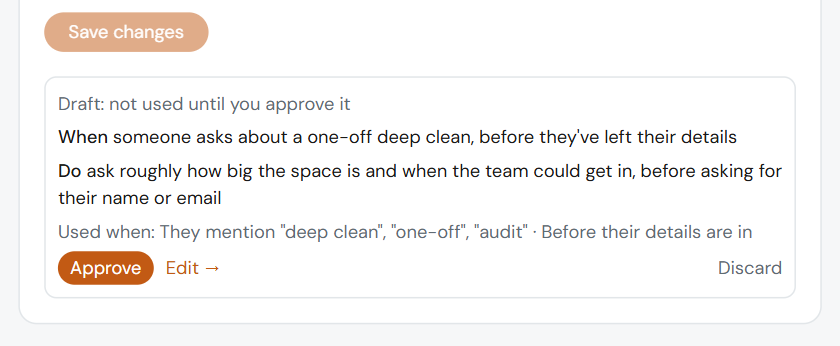
Ratings and lessons
Rate a conversation, say what it should have done, and approve the lesson.
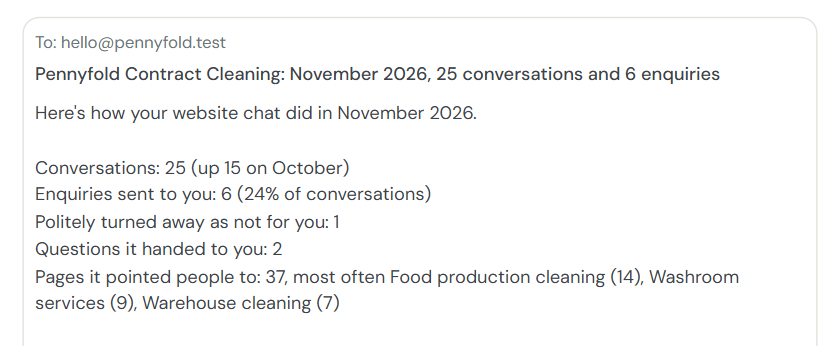
The monthly summary
How it's doing, once a month.
what we need from you
Three things, and we'll ask for them on the call.
- 01
Your website
The address is enough. We'll have AskFletch reading it before we talk.
- 02
Your rules
What you do, what you don't take on, and the prices it may quote. Anything you haven't approved is "the team will confirm".
- 03
Where leads go
Where enquiries should go, so each lead reaches the right person. On Connected, into your other systems too, through webhooks.
questions
Questions about getting started.
How much of my time does it take?
The setup call, usually a single one. After that, as much or as little as you like: answer the questions it passes to you, and correct or rate its replies when you want to.
Do I need to be technical?
No. It's one line of code, the same as an analytics tag, and we'll install it for you if you'd rather.
Can I see it working before the call?
Yes. See it at work for a business like yours, or ask our own chat in the corner of this page. When you book a call, we'll set up a demo on your own website first.
Can I change things after it's live?
Yes, as often as you like. Change its answers, what it turns away and the prices it may quote from your dashboard, or tell us and we'll do it.
Is there a contract?
Pick a 12-month term and setup is included, or go monthly with a one-off £249 setup fee. Pro is £99 a month and Connected is £249 a month, with the AI running costs included. See pricing.
What happens to my visitors' details?
You stay in control of them. We handle them only to deal with the enquiry, under a data processing agreement, and we never sell them.
start with a call
Book a call, and we'll set up a demo on your website first.
Twenty minutes, no slides. We'll have AskFletch reading your own site before we talk, so the first thing you see is how it would answer your visitors.